Friday, 17 March 2017

Sunday, 12 March 2017

Friday, 10 March 2017


Friday, 10 February 2017
Wednesday, 8 February 2017
Friday, 27 January 2017
Skills Development - Making the chain circle
To recreate the stock image of a chain link circle that I had used for my flatplan, I used Photoshop to edit the image of the chain that I had taken and removed the background of.
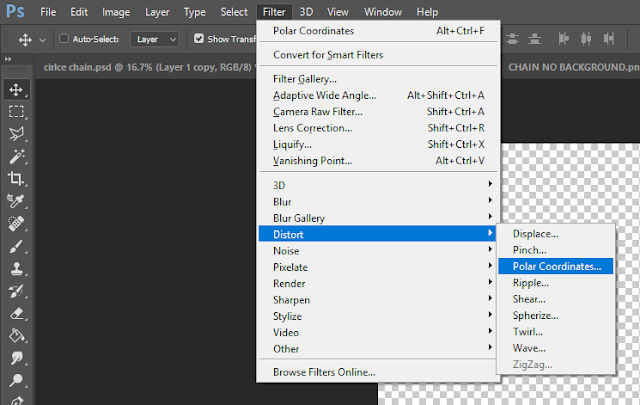


The first thing I tried was placing the image of the chain on a new document and using the polar coordinates setting, seen here:

The setting was very simple to use, I just had to select the "Rectangular to Polar" box, pictured here:

This did not quite give me the results I had hoped for, however, as it had only made a semi circle, pictured here:

I decided to try again with a longer chain, so I undid the polar coordinates command, duplicated the image I had and flipped it horizontally, before placing it next to the original image and merging the layers into one, like so:

I then tried the polar coordinates setting again and this time it created a circle like I had hoped for:

The circle was not perfect, however, as the image had been stretched so the chains looked too thin. To counter this, I undid the polar coordinates then stretched the original image upwards:

I experimented with different levels of distortion until I ended up with what I had hoped for:

Thursday, 26 January 2017
Edited Chain and Lock for Digipak


I removed the background from two of the images I took, using Photoshop, so these images can be used on my digipak to replace the stock images I used in my flatplan.
Subscribe to:
Posts (Atom)